Discovery and decision support · UX/UI pattern guide
Object card action bar
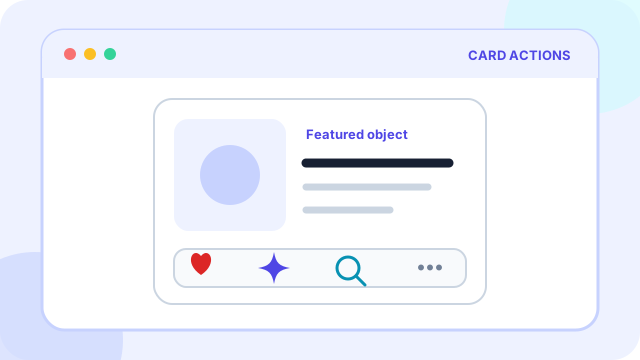
An object card action bar groups the most useful actions for a product, document, person, or media item directly with that object's summary.
At a glance
What the pattern is designed to accomplish
Reusable add-to-cart, ask-AI, wishlist, share, and details actions for product or content cards.
Planning price
€800
A starting budget anchor before discovery and technical scoping.
Typical effort
2-4 days
The implementation range depends on states, data, and integrations.
Pattern family
Discovery and decision support
Use the family to find adjacent patterns that support the same journey.
Use cases
When this pattern is a strong fit
Use the pattern when it removes a real decision or interaction burden, not simply because users recognize its visual form.
Best suited to
- Collections where users repeatedly act on individual objects
- Marketplaces, media libraries, dashboards, and knowledge tools
- Flows that benefit from saving, sharing, asking, or adding without opening detail pages
Anatomy
The essential parts of object card action bar
The visual treatment can change, but these responsibilities need to remain clear.
Part 1
One clear primary action and a restrained set of secondary actions
Define this part explicitly in the design and test it with realistic content and states.
Part 2
Labels or tooltips that explain unfamiliar icons
Define this part explicitly in the design and test it with realistic content and states.
Part 3
Persistent state for actions such as saved, selected, or added
Define this part explicitly in the design and test it with realistic content and states.
Part 4
A reliable route to the full object detail
Define this part explicitly in the design and test it with realistic content and states.
Implementation
Design and delivery guidance
The pattern works when interaction rules, content, data, and edge cases support the same user goal.
Recommended approach
- Choose actions from observed high-frequency tasks.
- Keep action order and placement stable across every object card.
- Use overflow only for genuinely secondary actions.
Common failure modes
- Turning the whole card into one link while nesting conflicting buttons inside it
- Showing too many equally prominent actions
- Using icons whose meaning changes between object types
Accessibility
Inclusive design requirements
Accessibility is part of the pattern's behavior and content model, not a visual pass added after implementation.
Minimum considerations
- Give repeated controls object-specific accessible names.
- Expose pressed, selected, or saved state programmatically.
- Ensure the card reading order remains logical before the action group.
History
How object card action bar emerged and who popularized it
Interface patterns usually evolve through several technologies and products. The distinction below avoids assigning a single inventor where the evidence points to gradual adoption.
Origins
How the pattern came about
Object-level controls combine two older ideas: toolbars from desktop graphical interfaces and cards from catalog and dashboard layouts. The pattern became more important as feeds placed many independent objects on one screen.
Popular adoption
Who helped make it mainstream
Social networks normalized like, comment, share, and save bars beneath each post. Material Design then documented cards and their actions as reusable interface components, spreading the model to products, files, and media.
History and practice sources
Related patterns
Continue through the pattern library
Adjacent patterns often need to be designed as one journey rather than as isolated components.
Discovery and decision support
Smart search and suggestions
Discovery and decision support
Filters, sorting, and chips
Discovery and decision support